
Running a service-based business or small agency in 2026 means juggling client projects, operations, automation and marketing, usually without a big team behind you. When it’s just you, or you plus a small team, every manual step costs real hours. The right tools give those hours back.
After years of testing (and retiring) dozens of apps, I’ve narrowed it down to six tools that run New Leaf Digital every day. They’re also the tools I recommend most often to clients who want a business that runs smoothly without adding headcount.
For each one, I’ll share what it does, how I use it, and a real-world example of how a small team uses it to save time.
This article contains affiliate links. If you sign up through them, I may earn a small commission at no extra cost to you.
1. ClickUp: The Operating System for My Business
ClickUp is where everything lives: projects, SOPs, client work, content and metrics. I use it as my business HQ and the main hub for client management.
It replaces a stack of separate tools: project tracking, documentation, internal chat and reporting. ClickUp AI helps me summarize meetings, draft SOPs and write task updates, so I spend less time writing about the work and more time doing it. ClickUp Super Agents handle work that was previously done in Zapier.
How small teams use it to save time:
- Recurring client work runs itself. A bookkeeper with two assistants sets up monthly close tasks once, with checklists and due dates. Every month, ClickUp recreates them automatically and assigns them to the right person. No one rebuilds the to-do list from memory.
- Status updates without the status meetings. A dashboard shows every active client, what stage they’re in and what’s overdue. The owner checks it in two minutes instead of asking everyone for an update on Monday morning. An interior designer can quickly see the status of items being sourced for a client.
- SOPs live next to the work. When a new team member picks up a task, the how-to doc is linked right inside it. Fewer “how do I do this again?” messages, and less time spent re-explaining.
💡 Pro Tip: Build one “Business HQ” space for your internal operations and one “Client Management” space with a folder for each client.
2. Attio CRM: Modern Relationship Management Made Easy
Attio is the modern CRM I use to track leads, clients and partners. It’s clean, customizable and built for AI-forward businesses, without the clunky setup of older CRMs.
I use it to:
- Track every client interaction in one place
- Kick off onboarding automatically when a lead becomes a client (Attio + Make + ClickUp)
- Keep an eye on renewals, referrals and pipeline health
How small teams use it to save time:
- No more digging through inboxes. Attio syncs email and calendar, so when a client reaches out, anyone on the team can see the full history without forwarding threads around.
- Follow-ups don’t slip. A coach moves a lead to “Proposal sent” and a follow-up reminder is created automatically for three days later. Nobody has to remember to check.
- Referral partners are tracked, not guessed. Tag where each client came from and you’ll know which partners are actually sending business your way.
💡 Pro Tip: Use Attio’s custom objects and tags to link client records to their projects in ClickUp for a complete view of each client relationship.
3. Zite: AI-Built Business Apps
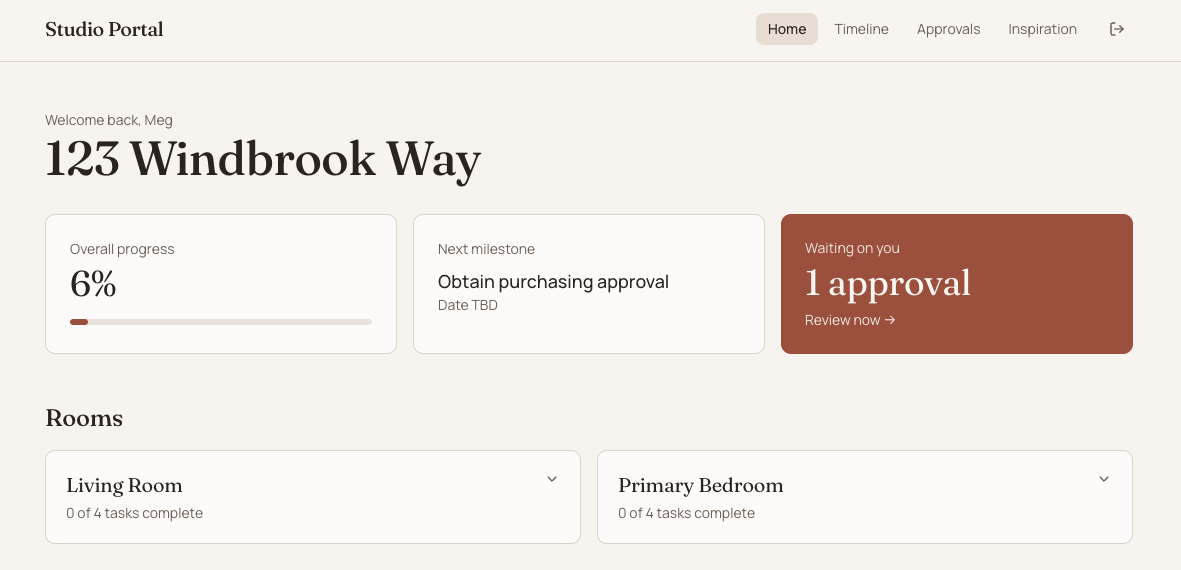
Zite lets you build custom business apps just by describing what you need. Connect it to Google Sheets, Zite’s built-in database, or your ClickUp or SmartSuite workspace, control who has access, and connect it to the other tools you use. Client portals, internal tools, calculators and dashboards that used to need a developer can now be built in an afternoon.
How small teams use it to save time:
- A client portal instead of “just checking in” emails. A design studio gives each client a simple portal showing project status, deliverables and next steps, pulled straight from ClickUp. Clients check it themselves instead of emailing for updates.
- Internal tools for repeat questions. A small agency builds a pricing calculator so anyone on the team can quote a standard package in minutes, without waiting on the owner.
- A simple view for people who don’t live in ClickUp. Contractors or part-time help see only what they need in a clean app, without learning a full project management tool.
4. Fillout Forms: Smart Forms That Feed Directly into ClickUp
Fillout makes client and team submissions seamless. Whether it’s onboarding, asset requests or feedback, each submission instantly becomes a task in ClickUp through their direct integration.
Conditional logic, file uploads, multi-step forms, scheduling and payments (all available on the free plan) make it more flexible than most form tools.
How small teams use it to save time:
- Onboarding without the back-and-forth. A new client fills out one intake form. Their answers, files and logins land in a new ClickUp task with everything the team needs to get started. No chasing details over email.
- Requests come in complete. A marketing team uses a content request form with required fields, so every request arrives with the deadline, assets and goals already attached.
- Booking and payment in one step. A consultant collects intake answers, schedules the kickoff call and takes the deposit in a single form instead of three separate tools.
5. Fireflies.ai: Meeting Notes Without the Busywork
Fireflies.ai joins client calls to record, transcribe and summarize them. I prefer it over its competitors because it integrates directly with ClickUp to turn meeting action items into tasks. Plus with the MCP server, you can easily integrate your notetaker in ClickUp Super Agents.
It’s one of the biggest time-savers in my week.
How small teams use it to save time:
- No one is stuck taking notes. Everyone on the call can actually participate, and the summary arrives in their inbox afterward.
- Action items become tasks automatically. After a client call, follow-ups show up in ClickUp, assigned and ready to go, instead of living in someone’s notebook.
- Easy catch-up for anyone who missed the meeting. A team member who couldn’t join reads a two-minute summary or searches the transcript for the exact decision instead of asking someone to recap.
6. Make.com: Automations That Connect Everything
Make is the glue between my tools. It connects apps that don’t talk to each other natively and handles the multi-step workflows that would otherwise be done by hand. Its visual builder makes it easy to see exactly what each automation is doing, and it’s more affordable than many alternatives as your automations grow.
How small teams use it to save time:
- One trigger, many steps. When a proposal is signed, Make creates the client in Attio, builds their project folder in ClickUp from a template, sends the welcome email and notifies the team. What used to be 30 minutes of setup per client now happens on its own.
- Invoices and payments stay in sync. When a payment comes in, the matching ClickUp task is updated so no one has to cross-check the payment platform.
- Weekly reports build themselves. Make pulls numbers from your tools into a single summary, so Friday reporting takes minutes instead of an afternoon.
Why I Chose These Tools
Over the years, I’ve tested dozens of apps and automation platforms and retired just as many. The tools I use now all meet one core requirement: they integrate deeply and quietly, without creating more work for me or my clients.
Together, they form a lean, scalable system for service providers and operations professionals who want to grow sustainably, not endlessly patch together new tech.
Each tool fits my business values:
- Clarity: everything in one place, easy to find and use
- Automation with intention: systems that reduce manual effort, not human connection
- Scalability: processes that work for solo business owners and small teams alike
How These Tools Work Together
Here’s what it looks like when a new client signs on in a business using this stack:
- The client fills out a Fillout intake form and books their kickoff call.
- Make creates their record in Attio and builds their project in ClickUp from a template.
- The kickoff call is recorded by Fireflies, and the action items land in ClickUp as tasks.
- The client checks progress in a Zite portal instead of emailing for updates.
No copying and pasting, no “did anyone send the welcome email?” and no details living in one person’s head.
Final Thoughts
These six tools are the foundation of my business systems. Together, they automate workflows, centralize communication and save me hours every week.
You don’t need more tools. You need better ones that actually work together.
If you’re ready to streamline your business operations, I can help you build a ClickUp system that connects these tools seamlessly.